Showing posts with label New Giveaway. Show all posts

Sunday, January 29, 2012

Winner of New Giveaway!

Today is the day to announce the winner of my New Giveaway! The winner will receive all five of my greeting cards (including the "I'm so glad we're friends" card, which is currently out of stock):


The winner will also receive a secret miniature, which I will now reveal. The secret miniature is this beautiful miniature hat-making kit from Dragonfly International:


The hat kit includes beautiful laser-cut silk fabric pieces, blue silk ribbon, gorgeous white flowers, trim--everything but glue and scissors! You know how much I enjoy making miniatures from kits. I hope this kit brings the winner a lot of joy!

And now, I'll reveal the winner. There were 50 qualified entries in the giveaway, and I used RANDOM.ORG to pick the winning number. Drumroll, please.... And the winner is #26:


Congratulations Ascension! I hope you enjoy your prizes! :-) Please email me your address within 3 days, so I can mail your prizes right away! Thank you to everyone who entered this giveaway. There will be more in the next few weeks, as I celebrate my first year of blogging! ;-) xoxo Jennifer


Wednesday, January 25, 2012

Blog Friends Are Real Friends

One of the really special things about blogging is the friends you make. Anna of LITTLETHINGS blog and I "met" when I won an adorable giveaway prize in her recent giveaway. In that process, we exchanged addresses, and we started following each other's blogs.

Blog friends are real friends.

Anna has been tracking my progress in building and decorating my 1920s lovers cottage. When I mentioned in a blog post that I wanted to add a bathtub to the room, Anna was quick to send me this fun photo of her niece's bathroom in Germany:


I love the view from that bathtub--talk about relaxing, right?! And how thoughtful of Anna to think of me!


Then recently Anna sent me these precious gifts in the mail, because she thought they would look lovely in the Lovers Cottage. How sweet! She signed her note "Best wishes and a hug from your blog-friend!"


That reminds me of Sans!' wonderful phrase "Blog friends are real friends." You can see that I borrowed her phrase and put it under a photo of Houndstooth Pup and Raccoon on my blog's right-hand sidebar. Thanks, Sans! ;-) And thank you, Anna! It is a blessing to have such sweet friends. :-)

By the way, there's still time to enter my New Giveaway! The prize includes all five of my greeting cards plus a surprise miniature. The giveaway ends this Saturday, January 28, 2012, and I'll announce the winner the next day. Until next time.... xoxo Jennifer

Monday, January 9, 2012

How to Add a Photo to Your Blog's Sidebar

I've held a number of blog giveaways, and one of the requirements to enter is often to post a giveaway photo on your own blog's sidebar. I've had quite a few people ask me about how to do this, so here's a little tutorial for you. These instructions are for posting a photo or other image on the sidebar of a Blogger blog using the "Add a Gadget" feature.


I'll use my own current blog giveaway as an example. First thing, go to my blog post and copy the small giveaway photo at the bottom of my post, then save it somewhere easy to find. Here's my blog post: http://www.plushpussycat.com/2012/01/new-giveaway.html Go there. Find that last smaller photo in the article and right-click on it. Choose the option that says, "Save as" or "Save image." Save the photo where you can find it later, like your desktop, or a place where you always save files or images. Good.

Now open a second window on your computer. Go to your own blog. Now go to the very top of your blog and click "Design," then click "Layout." You'll see the layout of your blog. At the top of the right sidebar in the layout, click "Add a Gadget." Now scroll down a list of choices until you find "Picture." Click the plus sign next to it. Now a "Configure Image" window opens.

In the spot that says "Title," you can type "Plushpussycat's Giveaway," or something like that. In the spot that says "Link," copy this into it: http://www.plushpussycat.com/2012/01/new-giveaway.html Just highlight the text of the web site url in the first window (my blog in this example), and hold down the "Ctrl" key and the "c" key at the same time. Then go to the "Configure Image" window and hold down the "Ctrl" key and the "v" key at the same time. Or you can type the url/web address in by hand. :-)

One more thing to go! You just need to click the "Choose File" button in the "Configure Image" window. From there, find where you stored the photo on your computer, and click the photo. You'll see the photo in the "Configure Image" window now. Now hit the "Save" button in the "Configure Image" window. Now all you see is the "Layout" page. In the right-hand column, just under the words "Add a Gadget," it says "Plushpussycat's Giveaway," or whatever you typed before. Hit the "Save" button at the top of the "Layout" page, and then hit the "View Blog" button to see your work.

You did it--yay! Congratulations on learning a new skill! It's time to pat yourself on the back! I hope you found this tutorial helpful. Until next time.... xoxo Jennifer

Saturday, January 7, 2012

New Giveaway!

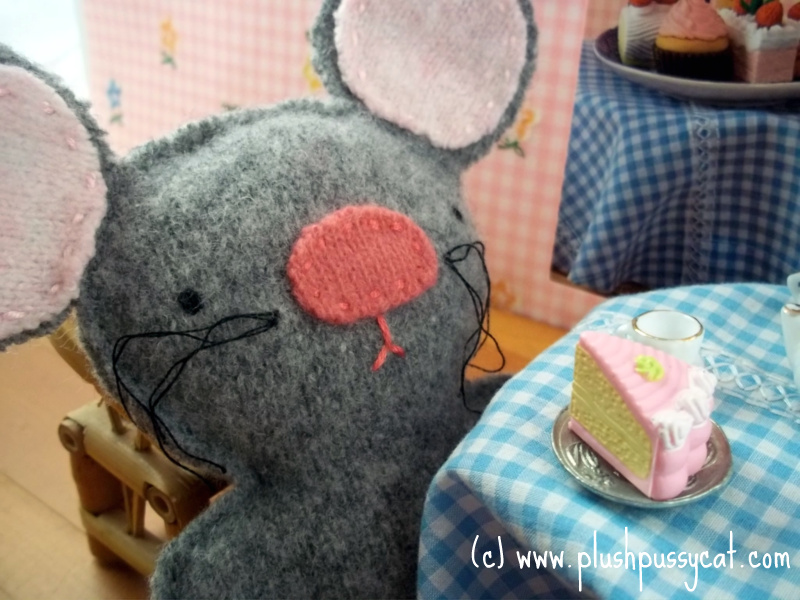
Mouse has stopped in a coffee shop for a piece of cake, but he's in shock!

The wall art in the coffee shop looks as if it might be a photo of him!

2/29/12 update: This giveaway is now closed. The winner has been announced here!

The Big Miniatures Giveaway just ended, and next month I'm going to be celebrating one year of blogging--woohoo! :-) I thought this would be a good time to open up a new giveaway! ;-) Mouse has just noticed that he is a featured character in one of my greeting cards (two of my cards, actually!).


Mouse is featured in both my birthday card and a card that is blank inside. The birthday card reads, "It's your birthday. Time for a treat!"


Then there's Plushpussycat and Tomcat. Tomcat has brought flowers for Plushpussycat on their picnic date. Inside, the card reads, "Oh my! You shouldn't have!" This is a common way of saying "thank you."


Next is my friendship card featuring Houndstooth Pup and Raccoon. Inside it reads, "I'm so glad we're friends." I love to send this card to people who love plushies or miniatures and to other friends too! :-)


Finally, there's the card with Bella the Bride Bunny on the front. It is blank inside and is great for bridal showers, weddings, anniversaries, friends who are struggling with dating, and so on. 

What You Could Win: So, there are five cards total in my greeting card line, and that is exactly what is up for grabs in this giveaway--all five cards! I'll also throw in a miniature surprise. I won't tell you what the surprise is until I announce the winner, either! ;-)

This giveaway ends Saturday, January 28, 2012 at 12 midnight PST, and I'll announce the winner on Sunday, January 29, 2012. I'll pick the winner from the pool of qualified entries using a random number generator. I must hear back from the winner by end of day Tuesday, January 31, 2012. If I don't, I'll pick another winner, again using the random number generator. This giveaway is open to anyone who meets the below criteria. The postage is on me.

Giveaway requirements:

1) Be a follower / member (or become one now) of this blog using Google Friend Connect (on my upper right-hand sidebar). (Required) 
2) Leave a nice comment on this post. (Required)
If you like, please tell me what types of cards you buy most. Examples: birthday, sympathy, wedding, get well soon, etc. (not required, but appreciated).
3) Please help me spread the word about this giveaway by publishing it on your blog (not required, but very much appreciated). :-) Here's the image to use:


For help in how to post the giveaway image on your blog's sidebar, there are instructions here. 

I hope you like this giveaway! Remember that you could win all five greeting cards plus a miniature surprise! Thank you to all of the friends of Plushpussycat. Good luck in the draw! Until next time.... xoxo Jennifer